


Apple has released developer beta 4 of macOS 26.4, bringing a mix of practical improvements, long-awaited bug fixes, and a small design bonus for users.
While this beta is still part of the testing cycle ahead of the public release, several notable additions are already visible. From better battery management tools to the return of a familiar Safari layout, the update introduces a handful of changes Mac users have been asking for.
Here’s what’s new so far.
Safari’s compact tabs are coming back
One of the most noticeable changes in macOS 26.4 is the expected return of Compact Tabs in Safari.
Apple removed the compact tab layout when macOS 26 first launched, which frustrated many users who preferred the more space-efficient design.
Based on the previous beta releases, the compact tab option is set to return in macOS 26.4, giving users another way to manage tabs without the larger default layout.
For people who keep dozens of tabs open at once, this small change can make Safari feel much cleaner and easier to navigate.
New Charge Limit setting helps protect Mac battery health
Another practical addition is a Charge Limit feature, which lets users cap their Mac’s battery charge level.
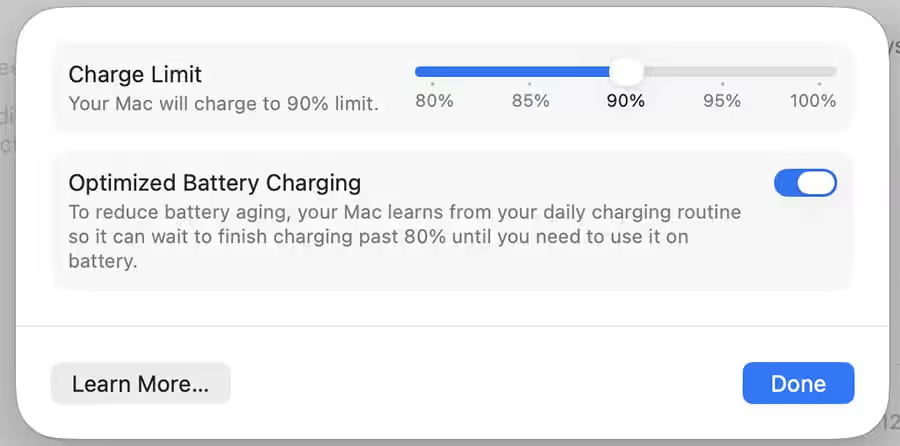
This setting allows users to set a maximum charge between 80% and 100%, helping reduce battery wear over time.
Limiting maximum charge has been a popular feature in third-party battery utilities for years, and it is now becoming a native macOS option.
For laptops like the MacBook Neo and other MacBooks that often stay plugged in for long periods, this feature could help extend long-term battery health.
Apple fixes the window resize cursor bug
macOS 26.4 also fixes a long-standing window resize pointer issue.
Previously, when resizing windows, the cursor sometimes did not align with the corner of the window correctly. The visual mismatch made resizing feel slightly off.
Apple originally listed the issue as fixed in macOS 26.3 before reclassifying it as a known bug. With the latest beta, the fix finally appears to be properly implemented.
macOS Starts warning about Rosetta apps
Apple is also continuing its transition away from Rosetta 2, the compatibility layer that allows Intel-based apps to run on Apple silicon Macs.
In macOS 26.4, users will begin seeing warnings when launching apps that rely on Rosetta. The change signals that Apple is preparing to fully phase out Rosetta support in the next major macOS release.
Developers are expected to transition their apps to native Apple silicon compatibility before macOS 27 arrives.
MacBook Neo wallpapers arrive for all Macs
macOS 26.4 also adds a cosmetic bonus.
Apple has included the new wallpapers originally introduced with the MacBook Neo, meaning users do not need to buy the $599 laptop to use them.

The four wallpapers are available in the Wallpaper section of System Settings and include colors inspired by Apple’s new Mac lineup:
- Mac Purple
- Mac Blue
- Mac Pink
- Mac Yellow
They mirror the vibrant marketing aesthetic Apple used when unveiling the MacBook Neo earlier this month. If you’re not looking to risk the beta for some wallpapers, you can grab the MacBook Neo wallpapers from here.
When macOS 26.4 will be released
The update is currently available as a developer beta, with a public release expected soon if testing continues on schedule.
Apple typically rolls out final macOS updates shortly after the beta cycle stabilizes, so macOS 26.4 could arrive for all users in the coming weeks.
As always with beta releases, more features or changes may still appear before the final version ships.



