WhatsApp Web is finally catching up to the desktop app. After being in development for nearly a year, voice and video calling are now rolling out to WhatsApp Web beta users, starting with one-on-one chats.
If you’ve ever wished you could take a quick call from your browser without installing the desktop app, that’s now becoming a reality.
Calling on WhatsApp Web, no app required
According to WABetaInfo, the feature is now reaching users enrolled in WhatsApp Web’s beta program. The initial rollout focuses on individual chats only, meaning you can place voice calls and video calls directly from your browser.
To start a call, simply open a chat and tap the call button, just like you would on mobile or desktop.
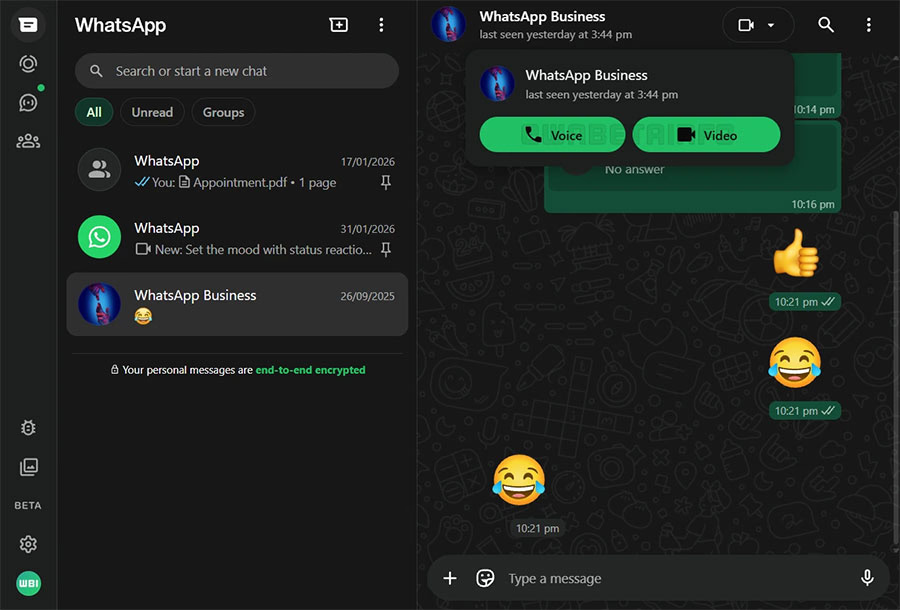
WhatsApp has reportedly spent about a year refining the experience to ensure it closely mirrors the functionality of its desktop apps.
Security and screen sharing
Just like on iOS and Android, web-based calls are:
• End-to-end encrypted
• Secured using Signal’s protocol
For video calls, WhatsApp Web also supports screen sharing, making it useful for quick demos or collaboration.
That’s a major step forward for users who rely heavily on the browser version during work hours.
Worth checking out: How to Add Reaction Stickers to Your WhatsApp Status
Group calls are still coming
Group voice and video calls are not live yet on WhatsApp Web, but they are reportedly still in development.
When they do arrive, expectations include:
• Support for up to 32 participants
• Call links
• Scheduled calls
For now, group chat calling remains limited to mobile and desktop apps.
How to join the WhatsApp Web beta
If you want early access to new features like this, here’s how to enroll:
- Open WhatsApp Web
- Go to Settings
- Tap Help and Feedback
- Toggle on Join the Beta
Access is not guaranteed immediately, but beta users typically receive new features first.
Wider rollout coming soon
Right now, calling is limited to beta users, but WhatsApp is expected to expand availability over the coming weeks.
This move makes WhatsApp Web far more capable and removes one of its biggest limitations compared to the desktop app.
For users who prefer working straight from the browser, this is a big quality-of-life upgrade.