
Spotify is stepping deeper into audio intelligence with a new feature designed to make playlists sound more cohesive. Called Smart Reorder, the tool analyzes tempo and musical key to rearrange tracks for smoother transitions.
The move comes amid growing competition between streaming platforms focused on eliminating awkward song-to-song shifts.
What smart reorder actually does
Smart Reorder evaluates two core musical properties:
- Beats per minute (BPM)
- Musical key
By grouping tracks with similar tempo and harmonic structure, Spotify aims to reduce abrupt transitions and create a more continuous listening experience.
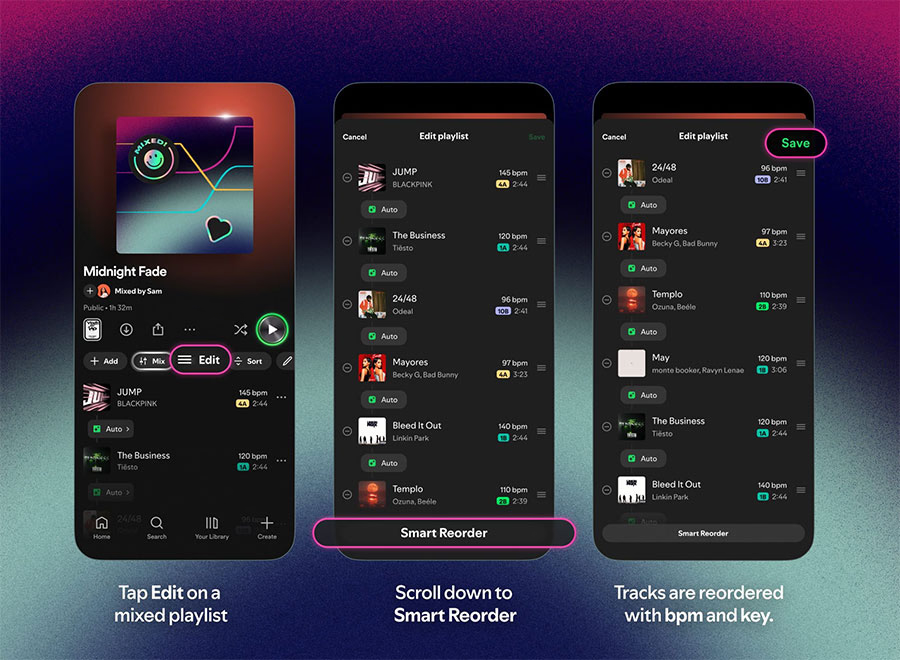
Rather than manually adjusting crossfade settings or reordering songs one by one, Premium subscribers can let Spotify handle the sequencing automatically.
How to use smart reorder
Spotify says the process takes just a few taps:
- Open one of your playlists.
- Tap Mix, then select Edit.
- Choose Smart Reorder.
The playlist will then reshuffle based on BPM and key alignment.
This builds on Spotify’s previous transition-focused updates, including tools introduced last fall that allowed finer control over crossfade and transition points.
Streaming wars: audio transitions become the new battleground
Spotify isn’t alone in prioritizing seamless playback.
Apple recently enhanced transitions in Apple Music with AutoMix as part of iOS 26. Unlike Smart Reorder, AutoMix dynamically blends tracks in real time without requiring user adjustments.
The broader trend is clear: streaming platforms are competing not just on catalog size or exclusives, but on how intelligently songs connect.
For listeners, that means fewer jarring tempo jumps and more fluid playlists.