
iOS 26.2 quietly slipped in a clever AirDrop upgrade, and it’s one of those features you won’t stop using once you try it.
Meet AirDrop codes. Think of them as a temporary handshake between two iPhones. No contacts. No wide-open “Everyone” mode. Just quick, controlled sharing.
What Are AirDrop Codes?
AirDrop codes add a safety layer when sharing with people who are not in your contacts. Instead of loosening your AirDrop settings, the receiver shows a one-time code. The sender enters it, and boom, AirDrop unlocked.
Apple explains it like this:
AirDrop codes offer an additional layer of verification when using AirDrop with unknown contacts by providing a code on the receiver’s device that the sender must enter to complete the transfer.
Why This Is Actually Useful
We’ve all been there. You want to AirDrop photos to a coworker, a classmate, or someone you just met.
Your options used to be:
- Add them as a contact. Awkward and slow.
- Enable Everyone for 10 Minutes. Convenient but risky.
AirDrop codes land perfectly in the middle. Fast, safe, and drama-free.
How to Use AirDrop Codes in iOS 26.2
Follow these simple steps:
- Open Settings on your iPhone
- Go to General
- Tap AirDrop
- Choose to share using an AirDrop code
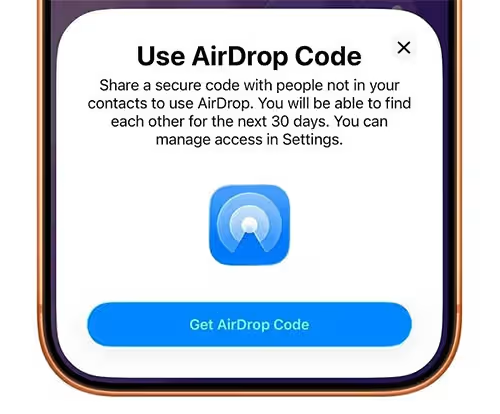
When the receiver generates a code, the sender enters it to confirm the connection.
That’s it. No toggles. No contact cards.
The 30-Day Bonus
Here’s the neat part. Once you use an AirDrop code with someone, you stay authorized for 30 days.
Apple notes: “You will automatically appear for 30 days to people you have shared a one-time code with.”
You can manage or remove these temporary AirDrop connections anytime from Settings > General > AirDrop.
When AirDrop Codes Shine
AirDrop codes are perfect for:
- Work meetings
- Events and conferences
- School projects
- Travel photos with new friends
- Quick file sharing without long-term contact clutter
Final Thoughts
AirDrop codes feel like Apple fixing a small but annoying problem in a very Apple way. Simple, secure, and just works.
If you AirDrop files more than once to people outside your contacts, this feature alone makes iOS 26.2 worth updating for.

![Can You Easily Repair the MacBook Neo? Teardown Reveals a Surprisingly Repair-Friendly Design [U]](https://404daily.com/wp-content/uploads/2026/03/macbook-neo-easy-to-repair-300x158.webp)