
Perplexity’s WhatsApp Integration Makes It Effortless to Fact-Check Messages, Ask Questions, and Get Web-Sourced Answers.
We’ve all been there; you get a message forwarded from your aunt or friend that’s a little too wild to believe. But how can you quickly verify whether it’s legit? Enter Perplexity AI on WhatsApp, a super handy tool that’s just landed, and it might just be your new go-to for fact-checking those suspicious forwards.
Here’s how you can use Perplexity on WhatsApp, and why it’s an absolute game changer when it comes to quickly debunking myths or checking the facts of that random message that’s been circulating your family group chat.
Getting Started with Perplexity on WhatsApp
Getting started with Perplexity on WhatsApp is incredibly simple – no account setup, no complex steps. All you need to do is start a new chat, and you’re good to go!
Instructions to start:
- Open WhatsApp and tap the Plus (+) button to start a new chat.
- In the contact search bar, type this number: +1 (833) 436-3285.
- Hit Chat, and voila! You can start messaging Perplexity AI right away.
Once you’ve started chatting, all you need to do is ask questions or forward messages to Perplexity. It’s as easy as sending a text.
How Perplexity Can Help Fact-Check Your Forwarded Messages
Here’s the best part – you can actually use Perplexity to verify forwarded messages you’ve received. Whether it’s a chain message from a relative or a viral post from an unknown source, Perplexity can help you separate the facts from the fiction.
Here’s how to do it:
- Forward the message: Simply forward the suspicious message to Perplexity in your WhatsApp chat.
- Wait for the response: Perplexity will process the message and give you a response, often including reliable sources and links, so you can verify the information.
- Review the answer: Perplexity’s response will be quick, and it will often provide concise, fact-checked data on the topic. If it’s a viral rumor or scam, Perplexity will call it out.
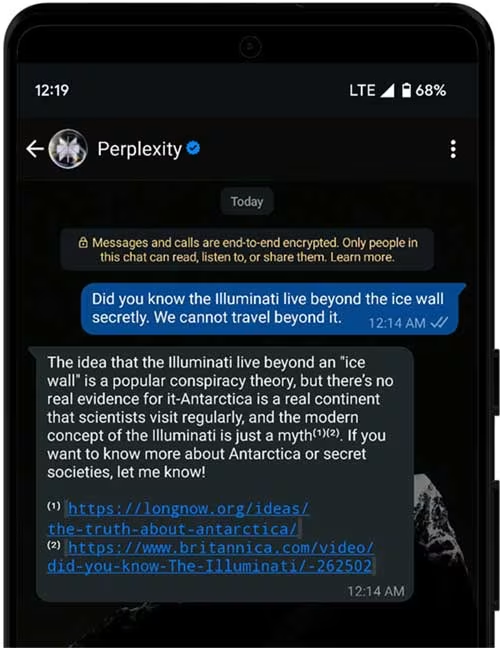
For example, if you receive a forwarded message claiming a new law passed that you’ve never heard of, simply forward it to Perplexity and wait for the response. You’ll either get confirmation or a quick debunking, along with credible links to back it up.
Additional Features: Image Generation and Editing
Not only can Perplexity help you fact-check, but it also offers features like image generation and image editing. Have a meme that’s being shared around? Ask Perplexity to “make this person bald” or generate a new version, and it will quickly whip up something for you. You can even ask it to edit images and share them directly in the chat.
Just note, responses from Perplexity are short and to the point. For those who prefer more detailed answers, you may want to compare it with ChatGPT, which can provide more in-depth replies and even tables when necessary. However, what sets Perplexity apart is its seamless integration for fast, on-the-go answers, plus the ability to fact-check forwarded messages on the fly.
Related: No Skills Needed: Google Gemini’s AI Can Edit Any Photo with a Few Words
Why It’s Useful
In today’s world of misinformation and viral rumors, having a reliable tool like Perplexity on WhatsApp can be a lifesaver. Whether you’re a skeptic or just a curious user, being able to instantly fact-check forwarded messages saves you from falling for fake news and scams.
The added bonus? You don’t need to go hunting for a web browser, or open a bunch of tabs to check multiple sources. It’s all right there in WhatsApp, one click away.
In Conclusion: Is Perplexity the New Fact-Checking Friend You Didn’t Know You Needed?
Perplexity on WhatsApp is an incredibly handy tool for quickly verifying information. Whether you’re dealing with that forwarded message from your uncle or just need some fast answers, this integration can save you time, keep you informed, and maybe even spare you from embarrassment when debunking those viral rumors.
Related: WhatsApp’s New Privacy Feature Blocks Chat Exports and Auto Downloads
So next time you get that dubious message in your chat, don’t panic. Just send it over to Perplexity and get the facts, straight from the source.