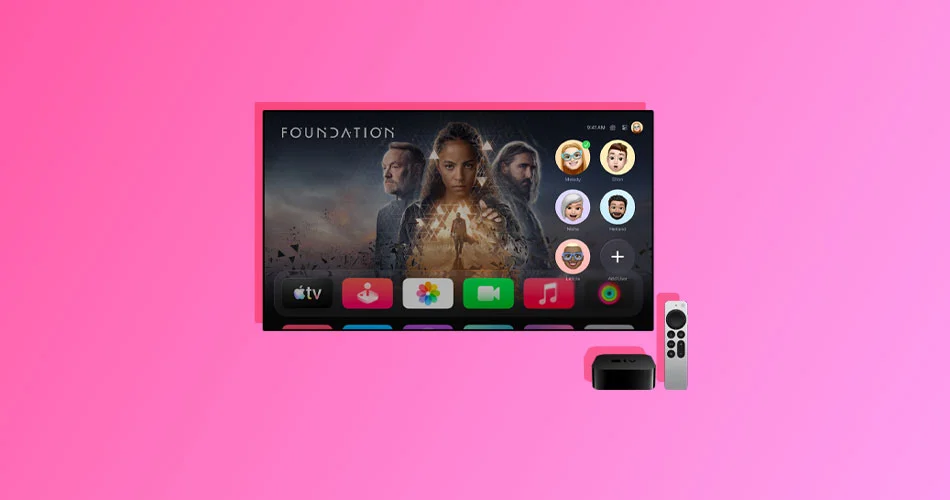
Starting with tvOS 26.2, Apple quietly introduced a new behavior on Apple TV 4K. Every time you wake the device from sleep, you’re greeted with a user profile selection screen before you can get to the Home screen.
For households with multiple users, this makes sense. Profiles help keep watch history, recommendations, and Apple TV app progress separate. But if you are the only person using your Apple TV, the extra step can feel unnecessary and slow.
The good news is that Apple lets you turn this screen off entirely. Here’s how to do it.
Why Apple Added the Profile Screen
Apple TV profiles are designed to personalize the experience for each user in a shared home. Each profile has its own recommendations, Up Next queue, and synced viewing history across devices.
When tvOS 26.2 rolled out, Apple made the profile picker appear automatically on wake. That change ensures everyone selects the right profile, but it also adds friction for solo users who just want to start watching immediately.
Thankfully, Apple did not force this behavior.
How to Disable the User Profile Selection Screen
Turning off the profile screen only takes a few seconds.
- Open Settings on your Apple TV
- Select Profiles and Accounts
- Turn off Choose Profile on Wake
Once this toggle is disabled, your Apple TV will skip the profile selection screen and go straight to the Home screen every time you wake it.
No confirmation screens, no restart required. The change applies immediately.
What Happens When You Turn It Off
Disabling the profile screen does not remove any user profiles from your Apple TV.
Your existing profiles, watch history, and recommendations remain intact. The only thing that changes is what happens when the device wakes from sleep.
If you ever need to switch profiles manually, you still can.
Just go to Settings, open Profiles and Accounts, and select the profile you want to use. This is useful if someone else occasionally uses your Apple TV but not often enough to justify seeing the profile picker every time.
Should You Leave Profiles On or Off
If you live alone or only use one Apple ID on your Apple TV, turning off the profile screen is an easy quality-of-life improvement. It makes the Apple TV feel faster and more direct, especially if you wake it frequently throughout the day.
On the other hand, if multiple people in your household regularly use the same Apple TV, keeping the profile screen enabled still makes sense. It ensures everyone gets accurate recommendations and synced viewing progress.
Apple’s flexibility here is the right call. The feature is helpful, but not mandatory.
Final Thoughts
The user profiles screen on Apple TV 4K is a smart idea that can feel intrusive for single-user setups. Thankfully, Apple made it optional.
If you want your Apple TV to behave like it used to and jump straight into the Home screen, flipping one toggle in Settings is all it takes.
Sometimes the best updates are the ones you can turn off.