
Spotify has added a new set of controls that let users turn off most video content inside the app. If you prefer a cleaner listening experience, the new settings can essentially turn Spotify into an audio-focused app again.
Over the past few years, Spotify has steadily added more visual features, including music videos, Canvas animations, creator clips, and video podcasts. While some listeners enjoy those additions, others find them distracting.
The new video controls give users the option to disable those visuals and focus purely on music and audio.
Spotify’s new video controls explained
Spotify is introducing three different toggles that control how video appears inside the app.
These settings allow you to disable:
Music videos
Turning this off prevents music videos from playing. Even live video performances will switch to audio-only playback.
Canvas animations
Canvas refers to the short looping visuals that appear while a song plays. Disabling this option removes those animations entirely.
All other videos
This setting disables vertical videos, creator clips, and video podcasts. When turned off, those formats will continue playing as audio-only streams.
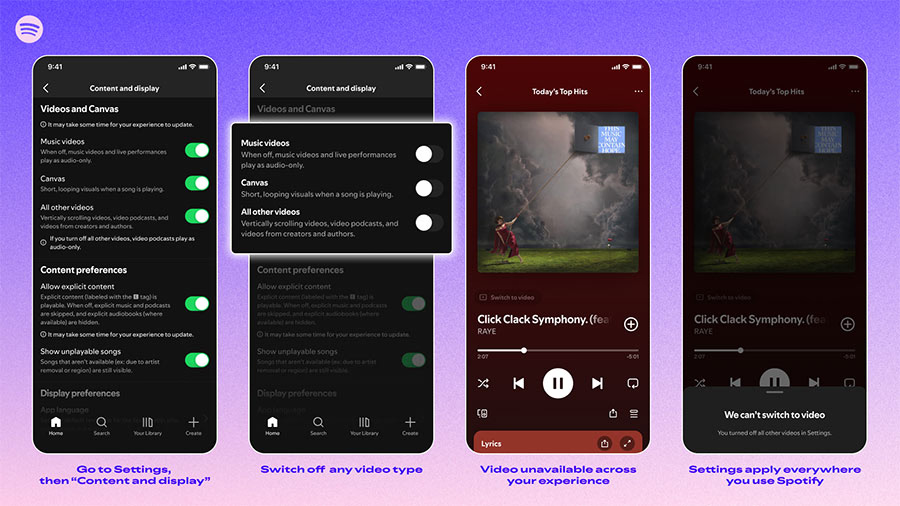
These controls were previously available only as parental settings, but Spotify is now rolling them out to everyone.
How to turn Spotify into an audio-only app
If you want the simplest listening experience possible, you can disable all video features in just a few steps.
- Open Spotify and head to Settings > Content and display
- Tap Videos and Canvas
- Turn off:
- Music videos
- Canvas
- All other videos
Once these settings are disabled, Spotify will behave much more like a traditional music player, focusing primarily on audio.
How to turn off Spotify Canvas
Canvas is the animated loop that appears when a song plays. Many users disable it because it can be visually distracting or use extra data.
To turn off Canvas:
- Open Spotify
- Navigate to Settings > Content and display > Videos and Canvas
- Toggle Canvas off
After disabling it, songs will no longer display animated visuals during playback.
SUGGESTED: How Spotify’s New Taste Profile Feature Lets You Control Your Music Recommendations
The feature is rolling out globally
Spotify says the new controls are rolling out globally starting this month.
The feature will be available to users across all plan types, including:
- Free users
- Individual Premium
- Duo plans
- Student plans
- Family plans
Family Plan managers will also be able to control video settings for members from subscription management.
One thing to note: these toggles do not disable video ads, and some ads may still include motion visuals similar to Canvas.
A simpler Spotify experience
With these new controls, Spotify is finally giving users more control over how busy the app feels.
For listeners who prefer music without extra visuals, turning off videos and Canvas makes Spotify feel much closer to a traditional audio player.