Apple’s new MacBook Neo keeps its design minimal with just two USB-C ports and a headphone jack. But there is an important detail buyers need to understand before plugging in an external SSD or monitor.
Both USB-C ports look identical. Internally, they are not.
Only one USB-C Port on MacBook Neo supports 10Gb/s and external displays
The MacBook Neo includes:
- One USB-C 3 port with data transfer speeds up to 10Gb/s
- One USB-C 2 port limited to 480Mb/s
The USB-C 3 port is the only one that supports DisplayPort output. If you want to connect an external monitor, this is the port you must use. It is also the better choice for high-speed external storage drives.
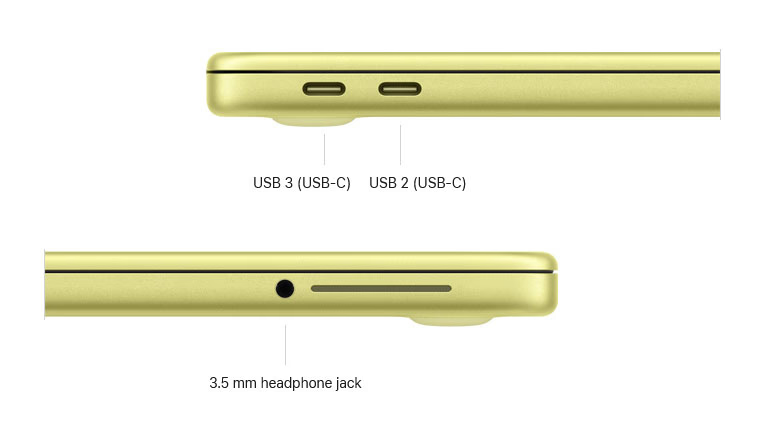
The second USB-C port supports charging and basic data transfers, but it does not support external displays and is capped at much slower USB 2 speeds.
For users moving large video files or using fast SSDs, plugging into the wrong port will significantly reduce performance.
Why the MacBook Neo has different USB-C speeds
The difference likely comes from the USB controller built into the A18 Pro chip, which powers the MacBook Neo. This is Apple’s first MacBook to use an A-series chip instead of an M-series processor, and that architectural change appears to affect port capabilities.
There is no external marking to distinguish the faster USB-C port from the slower one. That means users will need to rely on documentation or trial and error when setting up accessories.
Aside from the USB-C situation, the MacBook Neo includes:
- Two USB-C ports total
- A 3.5mm headphone jack
- Stereo speakers
- No MagSafe charging
At its $599 starting price, the MacBook Neo is clearly positioned as a budget-friendly MacBook for students and everyday users. For basic charging and light accessory use, the port difference may not matter. For power users who rely on external displays and fast storage, it is a detail worth paying attention to.
MacBook Neo is available for pre-order now and officially launches on March 11.