Apple packed iOS 26.2 with visible upgrades like Urgent reminders, offline Apple Music lyrics, and a refreshed Apple News app.
But one of the most useful changes is quietly tucked away in Accessibility settings, and it gives your iPhone a whole new way to get your attention.
With iOS 26.2, your iPhone can now flash the entire screen when a notification arrives. Not the camera LED. The display itself.
If you miss notifications easily, or keep your phone face up on a desk, this is one of those small features that ends up being surprisingly effective.
What Is Screen Flash for Notifications?
iOS has supported LED flash alerts for years, mainly as an accessibility feature. That option still exists, but iOS 26.2 adds something new.
Instead of blinking the camera flash, your iPhone can briefly light up the entire display when a notification comes in. It is quick, bright, and hard to miss, especially if you do not use Always On Display.
Worth checking out: iOS 26.2 Features: Everything New in Apple’s Latest iPhone Update
Apple calls this feature “Screen” flash, and you can even combine it with the LED flash if you want maximum visibility.
How to Turn On Screen Flash Alerts in iOS 26.2
Enabling the feature takes less than a minute.
- Open the Settings app
- Go to Accessibility
- Tap Audio & Visual
- Select Flash for Alerts
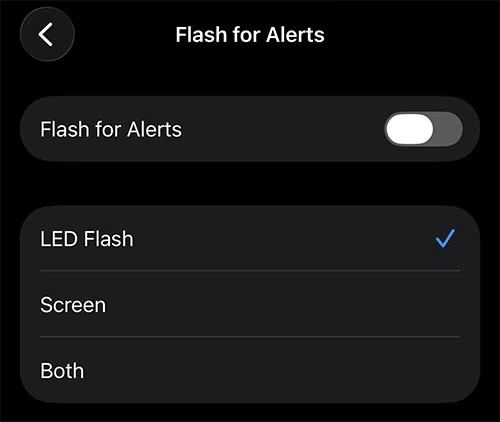
Inside this menu, you will see three options:
- LED Flash: Uses the camera flash
- Screen: Flashes the display
- Both: Uses LED and screen together
Toggle Screen on to enable the new feature. If you want the most noticeable alerts possible, you can turn on Both.
That is it. No restart required.
When Screen Flash Alerts Are Most Useful
This feature will not be for everyone. If you wear an Apple Watch and rely on haptic taps, you may never notice the difference.
But screen flash alerts make a lot of sense if:
- Your phone sits face up on a desk while you work
- You often miss notifications in loud environments
- You keep your phone on silent but still want visual cues
- You do not use an Apple Watch
The effect is especially noticeable when Always On Display is disabled, since the screen jumps from fully off to bright for a split second.
Battery and Practical Considerations
Because the flash is brief, battery impact should be minimal for most users. That said, if you receive a very high volume of notifications, combining LED and screen flash may be a bit overkill.
This feels like a feature Apple added quietly to avoid annoying users by default. But once you enable it, it is hard to ignore how useful it can be.
Final Thoughts
iOS 26.2 is full of quality of life upgrades, and screen flash alerts fit right into that theme. It is simple, optional, and genuinely helpful for the right kind of user.
If you have ever missed an important notification because your phone stayed dark and silent, this new setting is worth turning on.

![Can You Easily Repair the MacBook Neo? Teardown Reveals a Surprisingly Repair-Friendly Design [U]](https://404daily.com/wp-content/uploads/2026/03/macbook-neo-easy-to-repair-300x158.webp)