If you are fine with your kids watching regular YouTube videos but want YouTube Shorts completely out of the picture, there is finally a simple solution.
YouTube has rolled out a new parental control that lets parents block Shorts entirely on kids’ and teen accounts.
This change gives parents much more control over how their children use YouTube, without having to ban the platform altogether.
Below is what changed, why it matters, and exactly how to turn off YouTube Shorts for your kids.
Why Parents Are Blocking YouTube Shorts
Short-form video feeds are designed to keep users scrolling endlessly. For kids, that can quickly turn into:
- Excessive screen time
- Exposure to low-quality or AI-generated content
- Misinformation and disturbing videos
- Reduced attention span
Blocking TikTok is easy. Blocking short-form content inside YouTube has not been. Until now.
YouTube Shorts sit front and center inside the app, making them hard to avoid, even if your child only wants to watch longer, approved videos.
What YouTube Changed
YouTube has updated its parental controls to include a new Shorts-specific timer. Parents can now:
- Set a daily time limit for Shorts
- Reduce that limit to zero minutes
- Effectively block YouTube Shorts entirely
This works on both YouTube Kids and supervised teen accounts.
Setting the timer to zero removes access to the Shorts feed while keeping regular YouTube videos available.
How to Block YouTube Shorts for Your Kids
You will need to use Google Family Link, which manages supervised accounts.
Step 1: Open Google Family Link
- Open the Family Link app on your phone
- Select your child’s account
Step 2: Go to YouTube Controls
- Tap Controls
- Select YouTube or YouTube Kids, depending on the account
Step 3: Find Shorts Settings
- Look for YouTube Shorts or Shorts timer
- Tap to adjust the daily limit
Step 4: Set the Timer to Zero
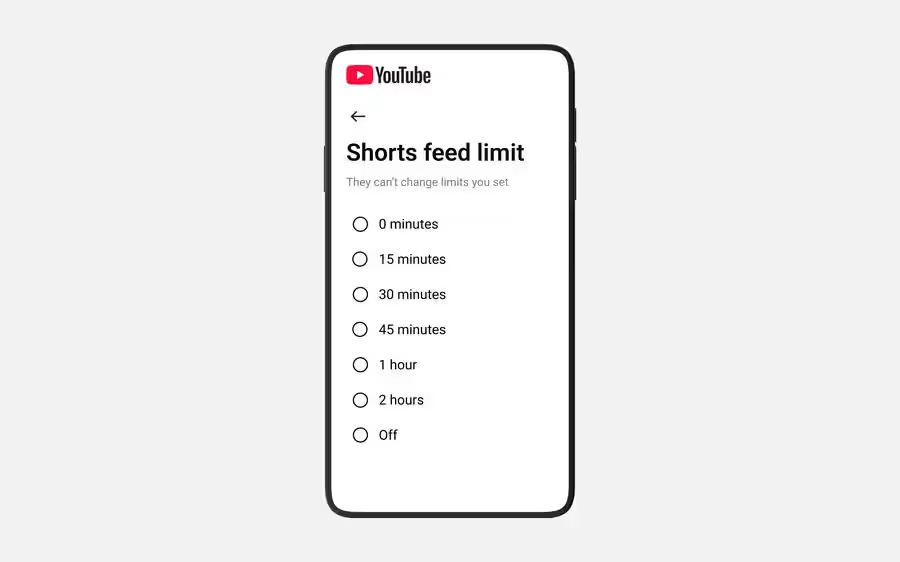
- Set Shorts time to 0 minutes
- Confirm your selection
Once this is done, your child will no longer be able to watch YouTube Shorts.
You Can Still Customize Access, Not Just Ban It
YouTube is not forcing this to be an all-or-nothing decision.
Parents can adjust Shorts access depending on the situation, such as:
- Zero minutes during school days
- 30 minutes after homework
- More time on weekends or long car rides
You can change the timer at any time, giving you flexibility without losing control.
Extra Tools Parents Should Know About
If your child uses a supervised account, YouTube also lets you manage:
- Bedtime reminders
- Take a Break reminders
- Custom screen time schedules
YouTube has also added other controls recently, including:
- A search filter to show only long-form videos
- Daily limits on Shorts viewing
- AI-based age detection that applies restrictions automatically
Google has also tightened supervision rules, so teens can no longer remove parental supervision on their own after turning 13.
The Bigger Picture
This update does not magically fix everything about kids and screen time. But it is a meaningful step.
Parents no longer have to choose between:
- Letting kids use YouTube freely
- Or banning YouTube entirely
Now, you can allow educational and long-form content while keeping the endless Shorts feed out of reach.
For many parents, that is exactly the balance they have been asking for.