Google Photos is getting a major upgrade, and this time the focus is on video. The app is rolling out new tools designed to make editing easier and highlight reels more polished, even if you are not someone who edits videos often.
From fresh templates to a redesigned editor, the update aims to help users turn everyday clips into smooth, shareable stories with very little effort.
New Templates With Music and Text
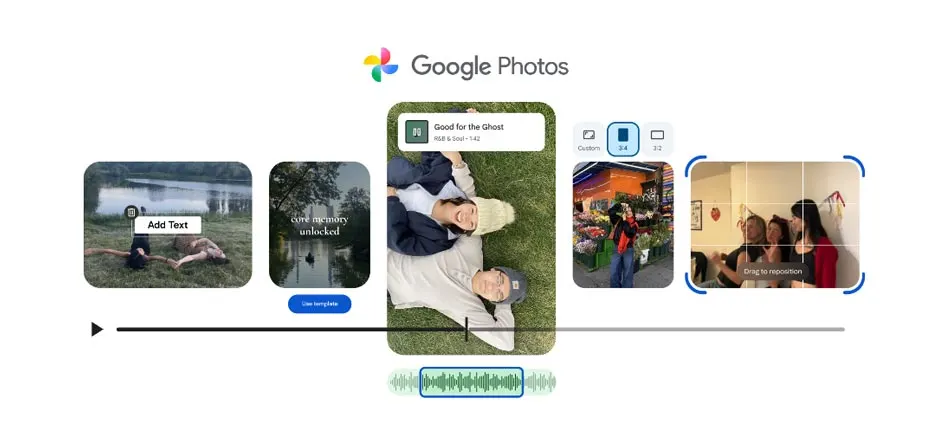
One of the standout additions is a set of new templates now rolling out on Android. These templates come with preset music and text overlays, so you can create a professional looking highlight reel in just a few taps.
All you do is pick a template, select your photos and clips, and Google Photos will generate a video that syncs to the beat of the music.
It is the kind of feature that works well for vacations, birthdays, or a quick Instagram reel without spending time on a full editing timeline.
Faster, Cleaner Highlight Reel Creation
Google is also making highlight reels easier to build from scratch. Highlight reels are simple collections of your favorite moments, and Google Photos has always been good at surfacing old memories. Now, the creation process is more streamlined.
Users can go to the Create tab and tap “Highlight Video” to start building a reel. After choosing your media, the app assembles everything into a single polished clip. The updated workflow is meant to cut down the number of steps while still giving users creative control.
A Redesigned Video Editor on Android and iOS
On top of templates, Google is introducing a redesigned video editor for both Android and iOS. The new version looks cleaner and is meant to be easier for everyday users to navigate.
The redesigned editor includes a “universal timeline” that lets you view all clips, audio, and media elements in one place. This makes it much easier to rearrange, trim, or replace content without jumping between menus.
It also features an “adaptive canvas” that adjusts the interface depending on the format of your project. If you are editing vertical clips for social media or horizontal videos for YouTube, the canvas adapts automatically.
Another helpful addition is the ability to add music and text into a single video clip. Previously, users often had to manage these elements separately, so combining them in one place simplifies the entire process.
Default Editor on Android, More Features on iOS
Google confirms that this new editor will now be the default on Android. iOS users also get many of the same improvements, including access to a built out music library. You can browse tracks inside the app to find the right soundtrack for your highlight reel.
Android users get an extra perk with the ability to add custom text overlays. This includes updated fonts, colors, and background styles so you can tailor titles or captions to match the vibe of your video.
A More Useful Google Photos for Everyday Users
Overall, the update makes Google Photos feel more like a lightweight video editing app and less like a simple gallery tool. With templates, music integration, and a cleaner timeline, users can put together polished clips without feeling overwhelmed.
The changes are rolling out now, starting with Android and expanding across platforms. If you use Google Photos to store and organize your memories, these new tools make it much easier to bring them to life.