Trying to install an APK on Android and suddenly getting blocked or delayed?
You’re not alone, and no, your phone isn’t broken.
Google is changing how sideloading works on Android, adding a 24-hour waiting period before you can install apps from unverified sources. It’s part of a bigger push to reduce malware, but for users who rely on APKs, it also adds friction to something that used to take seconds.
Here’s how the new system works, and how you can still sideload apps after the restriction.
What changed with Android sideloading?
Google has been tightening control over sideloading for a while, but this is the most noticeable shift yet.
Instead of letting users instantly install apps from outside the Play Store, Android will now require additional steps and a delay before installation is allowed. This change is part of a broader plan to limit app distribution to verified developers and stores, with stricter rules rolling out in select countries first and expanding globally over time.
If you’ve been searching for why Android sideloading now has a 24-hour wait, this is exactly why. Google is trying to slow down how quickly potentially harmful apps can be installed.
How the new sideloading system works
Google calls this the “advanced flow,” and the idea is simple. Add friction where it matters most.
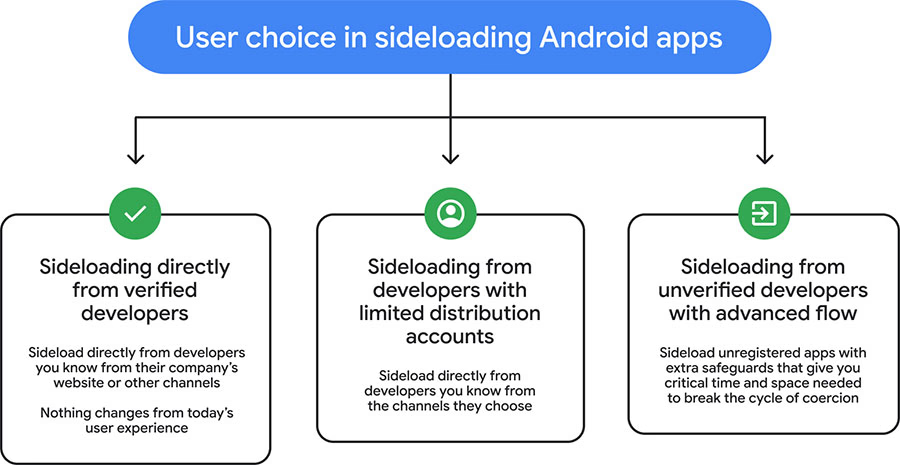
Instead of blocking sideloading entirely, Android now introduces multiple checkpoints. You can still install apps from unverified sources, but only after going through a process designed to make you stop and think.
This includes verifying that you’re not being pressured into installing an app, restarting your device to cut off potential scam access, and waiting a full 24 hours before completing the process.
It’s a one-time setup in most cases, but the delay is intentional.
How to sideload apps after the 24-hour restriction
If you still want to install APK files on Android after Google’s new restriction, here’s what the process looks like.
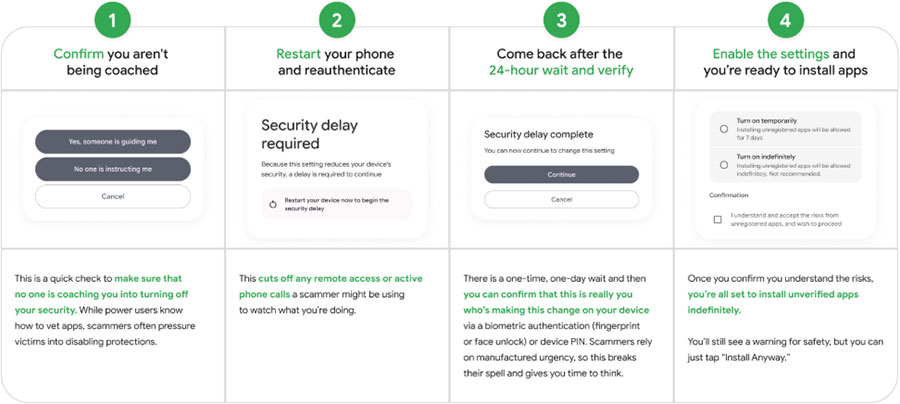
First, you’ll need to enable Developer Mode in your device settings. Once that’s active, Android will let you access additional controls related to app installation and security.
From there, you’ll go through a series of prompts asking you to confirm that you understand the risks and that you’re not being coerced into disabling protections. This step is specifically designed to counter common scam tactics.
After that, you’ll be required to restart your device. This isn’t just for show. Restarting cuts off active connections like calls or remote access tools that could be used to manipulate you.
Then comes the biggest change. You’ll need to wait 24 hours before returning to complete the process. Once the waiting period is over, you can authenticate the change using your PIN or biometrics, confirm the warning messages, and proceed with installing apps from unverified sources.
Depending on your settings, this access may last for a limited time or remain enabled.
Why Google added the 24-hour delay
At first glance, the delay feels unnecessary. But there’s a clear reason behind it.
Most mobile scams rely on urgency. Users are pressured into installing apps quickly, often while being guided over a call or message. By forcing a 24-hour pause, Android breaks that urgency and gives users time to reconsider.
It also makes it harder for attackers to maintain control over a device long enough to complete the installation process.
So while it may feel inconvenient, the delay is designed to reduce real-world attacks, not just theoretical risks.
Who this affects the most
If you only install apps from the Play Store, you’ll probably never notice this change.
But if you regularly sideload apps, install older versions, or use modified APKs, this update will impact how quickly you can do that. Developers testing apps outside the Play Store may also feel the added friction.
For power users, the process still exists, it just takes more time.
Final takeaway
Android sideloading isn’t going away, but it’s no longer instant.
Google is clearly prioritizing security over convenience, and the new 24-hour restriction reflects that shift. You can still install apps from outside the Play Store, but now you’ll need to plan ahead instead of doing it on the spot.
For some users, that’s a fair trade. For others, it’s the beginning of a more controlled Android experience.