Adobe and ChatGPT are teaming up in a way that makes creating, editing, and designing easier than ever. Starting today, many Adobe features from Photoshop, Acrobat, and Express are available directly inside ChatGPT.
That means you can edit photos, tweak PDFs, or design invitations using simple conversational prompts with no app switching required.
This is a big step for anyone who wants powerful creative tools without leaving a chat interface. Whether you’re working on a document for work, sprucing up your photos, or designing social media content, ChatGPT now has Adobe’s capabilities built in.
What You Can Do With Adobe Photoshop in ChatGPT
Photoshop has long been the go-to tool for editing and enhancing images. Now, you can access many of its features without leaving your chat window.
You can:
- Adjust specific parts of an image, like changing the brightness, contrast, or exposure.
- Apply creative effects, such as Glitch or Glow, while keeping the image quality intact.
- Make targeted edits using simple prompts like “enhance the background” or “make the colors pop.”
This integration makes Photoshop more accessible for casual users who might not be familiar with all the traditional tools but still want professional-quality results.
Design and Personalize With Adobe Express
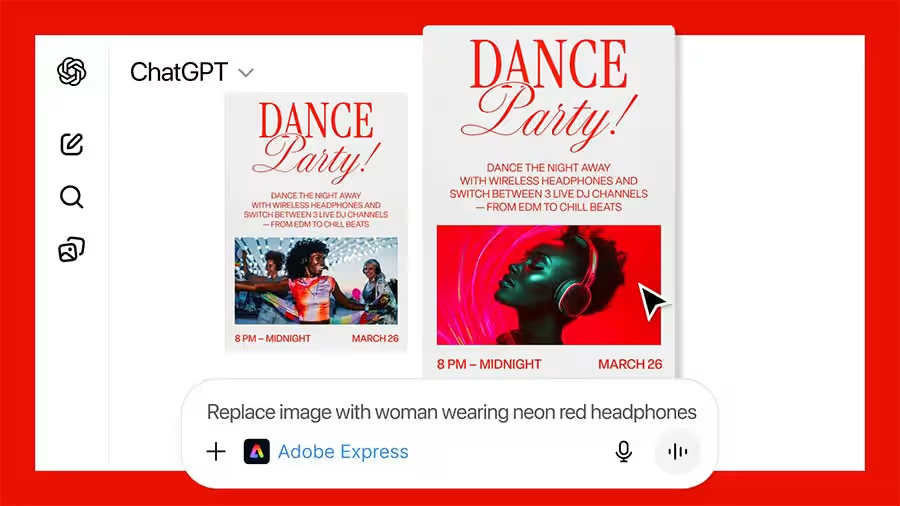
Adobe Express is all about creating polished designs quickly. Inside ChatGPT, you can browse Express’ library of templates and professional designs to create invitations, social media posts, and other content.
With simple prompts, you can:
- Replace images, fill in text, or animate designs.
- Iterate on edits without opening a separate app.
- Customize designs for any event, from a dance party invitation to a holiday card.
This is ideal for users who want to create standout content fast without needing design experience.
Transform Documents With Adobe Acrobat
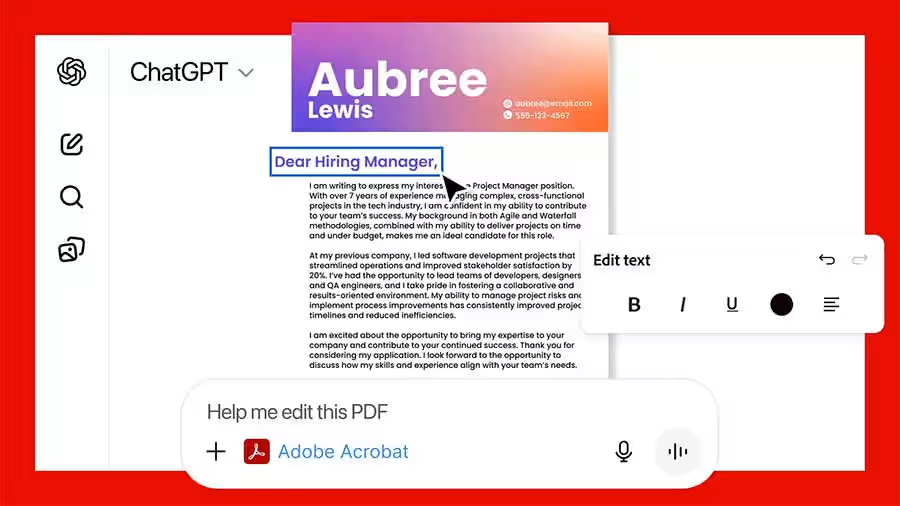
Acrobat in ChatGPT allows you to work with PDFs in a new way. You can:
- Edit PDFs directly in the chat.
- Extract text or tables and merge multiple files.
- Compress PDFs and convert files while keeping formatting intact.
- Redact sensitive information easily.
All of this is done with simple, conversational prompts. For example, you could type, “Adobe Acrobat, help me merge these PDFs,” and ChatGPT will guide the process seamlessly.
How to Access Adobe Tools in ChatGPT
Using these tools is simple. After connecting Adobe apps in Settings > Apps & Connectors, click the plus sign next to the chat field and select More. You can also trigger the apps with natural prompts like:
- “Adobe Photoshop, help me blur the background of this image.”
- “Adobe Acrobat, help me edit this PDF document.”
Adobe’s integrations are available worldwide for free across ChatGPT.com, and on iPhone, iPad, and Mac. Adobe Express is already on Android, with Photoshop and Acrobat support coming soon.
Seamless Experience Between ChatGPT and Adobe Apps
If you want to go further, you can always move from ChatGPT to Adobe’s standalone apps and pick up exactly where you left off. This makes it easy to start a quick edit in chat and then dive deeper with the full app when needed.
Worth checking out: ChatGPT Might Tap Into Apple Health Soon, and Honestly, I’m Not Sure How I Feel About It
For casual users or anyone looking for a faster, more intuitive workflow, this integration is a game changer. It combines the convenience of ChatGPT with the creative power of Adobe’s suite, all in one place.