YouTube is now rolling out a redesigned video player for its TV apps, bringing a cleaner layout and more traditional playback controls to the biggest screen in your home.
Google first previewed this new interface back in April during YouTube’s 20th anniversary, and the version now reaching users looks largely identical to that early reveal. This is not a ground-up redesign, but it is a thoughtful refresh aimed at making YouTube feel more at home alongside apps like Netflix, Apple TV, and Prime Video.
A Cleaner Layout with Smarter Placement
One of the most obvious changes is where information lives on screen. Video titles now sit in the top-left corner, instead of being embedded directly into the playback interface.
To compensate, YouTube has added a dedicated “Description” button that you can select to view video details, channel info, and metadata without cluttering the main viewing experience.
It is a small change, but it immediately makes the player feel less busy and easier to navigate from a distance.
Proper Playback Controls Finally Arrive
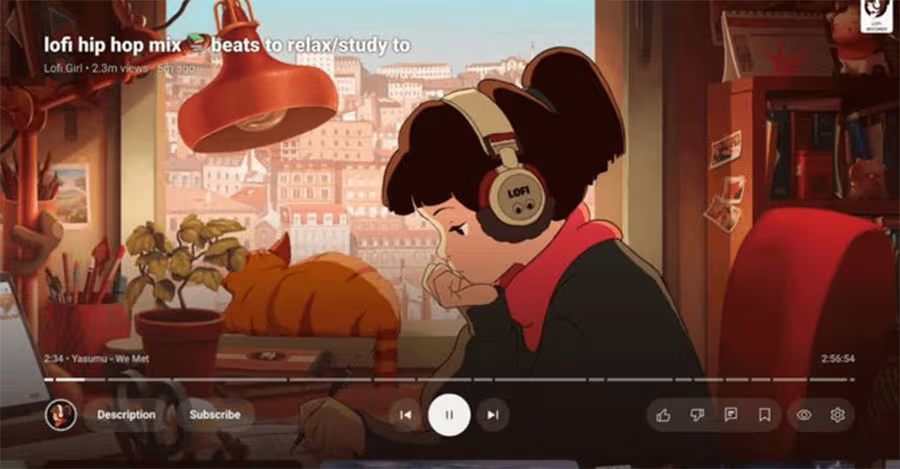
The biggest functional upgrade is the addition of true playback controls. Play, pause, skip forward, and skip backward are now clearly presented as on-screen buttons, rather than being hidden behind directional shortcuts.
This makes YouTube behave much more like a traditional streaming service, especially for casual viewers who are not familiar with YouTube’s long-standing remote shortcuts.
Related: YouTube TV Introduces Cheaper Genre-Based Plans, Including New Sports Bundle
There is a trade-off, though. Pressing left or right on your remote now opens the control overlay instead of instantly skipping ahead or back. It is not a dealbreaker, but it does require retraining some muscle memory for longtime users.
Subscriptions, Live Content, and Premium Perks
The Subscribe button is now permanently visible and context-aware. Google says it will adapt based on the content, switching to options like “Notify Me” for upcoming live streams or alternative actions for paywalled videos.
Live sports content, still relatively rare on YouTube but increasingly important, gains support for multiview where available. Meanwhile, YouTube Music and YouTube Premium subscribers will see a new “Display Mode” option, offering additional viewing flexibility depending on the content type.
Rolling out Broadly Across Platforms
The redesigned player is already appearing on a range of devices, including Google TV hardware and Apple TV, suggesting a wide rollout across smart TVs and streaming boxes. If you have not seen it yet, it is likely only a matter of time.
Overall, this update brings YouTube’s TV app closer to what users expect from a modern living-room streaming experience. It is not perfect, but it is a clear improvement, and a sign that Google is finally treating the TV interface as more than an afterthought.